
Can a Virtual Articulator Improve Occlusal Analysis in Prosthodontics?
A virtual articulator can help a dental team inspect tooth relationships and refine a restoration within a digital workflow. Its usefulness depends on the records, mounting method and movement inputs. A convincing animation does not establish the patient’s bite forces, predict bruxism-related wear or tell us how long a restoration will last.
This guide separates three questions: what the software displays, how closely the inputs represent the patient, and which clinical outcomes have actually been studied. These distinctions make virtual articulation useful without asking it to provide an unsupported prognosis.
What does a virtual articulator simulate?
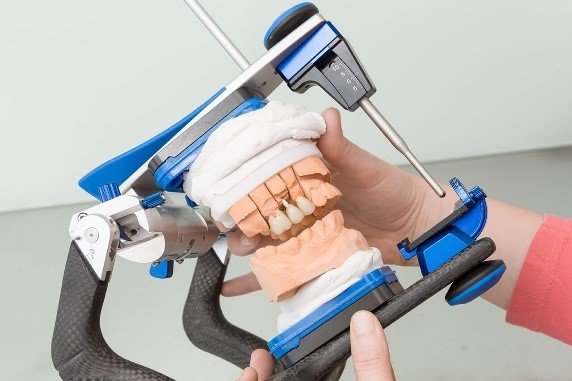
Mechanical and virtual articulators both represent selected aspects of jaw relationships and movement. Digital articulation adds the ability to inspect the model within a CAD environment and revise a design before manufacturing. That change in working medium is useful; it is not, by itself, evidence that every digital method is more accurate than every mechanical method.
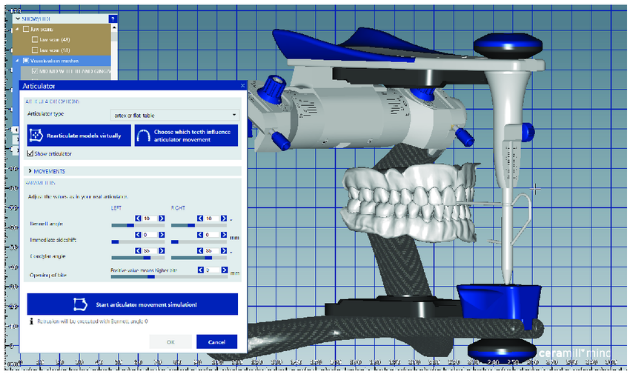
For a documented software example, the exocad Articulator Module lets the operator choose an articulator type, position the models, set available parameters and select protrusive, retrusive and lateral movements. The selected articulator affects which parameters are available. The simulation calculates movement paths and collision control; the resulting paths can support static and dynamic design adaptation. These are manufacturer-described functions, not clinical outcome guarantees.
Which records represent the patient?
Keep the surface scan, the interarch record, the mounting orientation and the movement information distinct. A scan of the teeth supplies geometry. A bite record relates the arches in the recorded position. Neither alone supplies a continuous recording of that person’s mandibular movements. Check what was measured, what was estimated and what remains a default setting.
Patient-specific movement import is a separate capability. The exocad Jaw Movement documentation describes loading recorded movement data when the project is configured appropriately and the Jaw Motion Import add-on is activated. The data can generate a virtual imprint in place of simulated articulator movements. An imported recording is still a measurement from a particular acquisition, not a complete prediction of all future chewing or bruxism activity.
Mounting technique also matters. In Lin and colleagues’ 2023 self-controlled clinical study, 14 participants underwent six mounting procedures. Hinge-axis and reference-plane deviations were compared with a kinematic digital facebow reference. CBCT-based mounting had the lowest hinge-axis deviation; smartphone and professional facial-scan mounting performed similarly. The endpoints were mounting geometry, not restoration survival or patient comfort. This comparison is not a reason to obtain CBCT solely to improve a routine virtual mounting.
What does a coloured contact display mean?
Identifying Contact Points: The clinician can examine how the teeth come into contact during these movements. In exocad, for example, the Show Distances function color-codes contacts, intersections, and clearance between restorations and opposing or adjacent teeth. Its Dynamic view can show contacts from simulated jaw movements.
That display describes geometric relationships between digital surfaces. It does not measure bite force. The documented display options and distance scale should guide its interpretation: a coloured intersection must not be relabelled as a force measurement or a material-stress result. Before changing a design in response, check the underlying scans, interarch relationship, mounting and movement inputs. A persuasive colour map cannot correct an inaccurate record.
Do virtual methods reduce adjustment or improve outcomes?
The answer depends on the method, restoration and endpoint. Elkady, Ameen and Sami’s 2023 randomized, triple-blind crossover trial enrolled 11 participants requiring a single molar crown. Three crowns per participant, 33 crowns in total, were made using digitized facebow mounting, a virtual Bonwill triangle or a face scan. The study found no statistically significant difference in intraoral adjustment time or adjustment volume among those methods. Thirty-three crowns were not 33 independent patients. The small single-crown trial does not establish equivalence for every indication or validate full-arch rehabilitation, fewer appointments or long-term survival.
A different endpoint was examined by Ma and colleagues in 2023. Records from 22 participants were used to design virtual posterior single crowns and three-unit bridges with deliberately introduced occlusal interferences. Adjustment based on recorded mandibular trajectories produced smaller surface deviations from natural teeth than adjustment based on articulator movement parameters. This was a comparison of virtual design results, not a trial showing longer survival of delivered restorations. It supports distinguishing recorded trajectories from parameter-based simulation rather than treating them as interchangeable.
Read a claim of “greater accuracy” by asking: accuracy of what, against which reference, in which patients and for which restoration? Mounting deviation, virtual surface deviation, chairside adjustment time and patient-reported comfort answer different questions. Improvement in one cannot be silently substituted for improvement in another.
Can a virtual articulator predict wear or restoration survival?
The cited exocad documentation describes movement and geometric contact functions. It does not validate routine prediction of bruxism-related wear, future tooth movement or restoration longevity. A simulated contact path is not a patient-specific long-term prognosis, and the cited clinical studies did not establish one.
Specialized research software may investigate loading, stress, strain or wear using additional models and assumptions. That is a separate analytical task from viewing geometric intersections. Before relying on such a prediction, ask for the exact software method, its inputs and assumptions, and validation against the clinical outcome being claimed. Do not infer validated force simulation from a colour map, or validated survival prediction from a movement animation.
Likewise, a digitally refined shape does not guarantee a perfect fit, natural appearance, comfort or freedom from adjustment. Any concern about bruxism, painful function or ongoing wear requires clinical assessment. This article provides education about evidence and workflow, not an individual diagnosis or treatment plan.
A practical review workflow
The following is a DDS educational checklist derived from the distinctions above, rather than a tested protocol promising improved outcomes:
- Define the question. Specify whether the task concerns static contacts, an excursion, mounting orientation or restoration design. Avoid a vague request to “optimize the bite.”
- Review the records. Check the scans and interarch relationship before interpreting contact maps. Document the intended jaw relationship and how it was recorded.
- Document the movement source. Label average settings, individually entered parameters and imported patient trajectories separately. Confirm module availability and compatibility in the exact installed software.
- Inspect and refine. Review the relevant movement paths and geometric contacts, then reassess the design after changes. Keep the original records and design version so discrepancies can be investigated.
- Verify clinically. Treat the digital proposal as a planning aid. Confirm the delivered restoration clinically and record any adjustment, rather than assuming that the simulation has eliminated the need for verification.
For example, if a planned crown appears to intersect its antagonist during a lateral movement, first check whether the movement is simulated from settings or imported from a recording. Then check the relationship and mounting of the models before accepting a design change. This is an illustrative decision sequence, not a reported patient success story.
Takeaway: virtual articulation can make movement and contact relationships easier to inspect during design. Its value comes from appropriate records and interpretation. Clinical outcomes, force measurements and long-term predictions require their own evidence.
References and source notes
- exocad. Articulator Module. Official software documentation: settings, mounting, movement simulation and design adaptation.
- exocad. Jaw Movement. Official documentation: patient-specific data import and module requirements.
- exocad. Visualizing intersections/distance to antagonists or adjacents. Official documentation: geometric contact, intersection and distance displays.
- Lin H, Pan Y, Wei X, Wang Y, Yu H, Cheng H. Comparison of the performance of various virtual articulator mounting procedures: a self-controlled clinical study. Clinical Oral Investigations. 2023;27:4017–4028. DOI: 10.1007/s00784-023-05028-9.
- Elkady AAM, Ameen SA, Sami RN. Intraoral occlusal adjustment time and volume required for CAD/CAM crowns fabricated with different virtual mounting methods (A randomized crossover trial). BDJ Open. 2023;9:19. DOI: 10.1038/s41405-023-00146-8.
- Ma L, Chao J, Liu F, Mei J, Shen J. A comparative study based on the mandibular movement track and the movement parameters of the virtual articulator in simulating occlusal adjustment. Hua Xi Kou Qiang Yi Xue Za Zhi. 2023;41:254–259. DOI: 10.7518/hxkq.2023.2022452.