Edentulous Patients: Records, Implant Planning and Follow-up
Edentulous patients, those who have lost all natural teeth, present unique challenges in dental practice, particularly in obtaining accurate scans and achieving proper occlusion. Unlike dentate patients, edentulous individuals lack natural landmarks such as teeth, which play a critical role in defining occlusal relationships and guiding the scanning process. The absence of teeth also affects the stability of prosthetic appliances during the scanning procedure and makes it more difficult to establish functional and esthetic outcomes.
Additionally, the varying conditions of the oral cavity, such as the shape and resilience of the soft tissues, ridge resorption, and the presence of undercuts or sharp bony edges, further complicate the process. These anatomical and physiological variations make it difficult to ensure precise impressions and accurate digital scans. Achieving proper occlusion in edentulous patients is equally challenging, as it requires careful consideration of jaw relations, vertical dimension, and balanced articulation without natural teeth to serve as reference points.
The first decision is the intended restoration: a conventional complete denture and an implant-supported restoration do not require identical records. Choose imaging and impression methods for the clinical question, rather than treating every digital step as mandatory.
In this article, we will explore how to effectively manage cases involving edentulous patients, focusing on the detailed steps and strategies required to address the challenges of obtaining accurate scans and achieving proper occlusion.
Learning objectives
After reading, you should be able to:
- Distinguish the records used for conventional complete dentures and implant-supported restorations, including patient CBCT, extraoral appliance scans and optical surface records.
- Identify where appliance seating, data registration and restorative-component compatibility require verification.
- Explain why implant planning, loading, guide processing and postoperative care require patient-specific assessment and applicable manufacturer instructions rather than a generic numerical protocol.
- Describe the role of individualized supportive care and clinically indicated follow-up imaging.
Step 1: Data Acquisition
CBCT (Cone-Beam Computed Tomography)
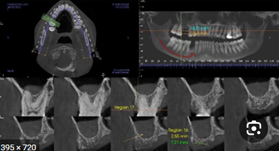
Cone-beam computed tomography (CBCT) supplies three-dimensional X-ray information about jaw anatomy. For implant planning, this can show ridge dimensions and relationships to structures such as the mandibular canal and maxillary sinus. The FDA advises using CBCT only when the needed information cannot be obtained adequately with other imaging methods.
Edentulism alone is not a reason for CBCT in every complete-denture case. The examination, treatment plan and existing images determine what further information is needed. ADA imaging guidance supports individual selection rather than a universal imaging schedule. A justified implant-planning scan does not by itself guarantee guide fit, implant position or prosthetic success.
Accurate Scan
Obtaining an accurate scan is a critical component of the data acquisition process for edentulous patients. Unlike dentate patients, edentulous individuals lack natural landmarks such as teeth, making it challenging to capture precise digital impressions. The anatomy of the edentulous ridge, including its shape, texture, and degree of resorption, varies significantly among patients, requiring tailored approaches for accurate scanning.
Advanced intraoral scanning technologies or traditional impression methods must be employed with care to capture the intricate details of the soft tissue and ridge morphology. Records must be checked before fabrication and the resulting prosthesis evaluated clinically for fit, comfort and function. Additionally, precise digital impressions facilitate better communication between the clinician and the dental laboratory, streamlining the design and manufacturing of custom prosthetic solutions.
Conventional Methods for Taking Impressions in Edentulous Patients
The conventional approach to taking impressions for edentulous patients involves multiple steps aimed at accurately capturing the anatomy of the edentulous ridges and surrounding tissues. The records contribute to denture fabrication, but fit and function still require clinical checks. The process generally includes:
1. Preliminary Impression
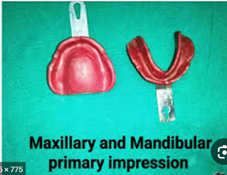
- Purpose: To obtain a rough mold of the oral cavity, including the edentulous ridges and surrounding anatomy.
- Materials Used: Typically, a stock tray and alginate or impression compound are used for this initial step.
- Outcome: The preliminary impression provides a general outline of the oral structures, which is used to create custom trays for the final impression.
2. Custom Tray Fabrication
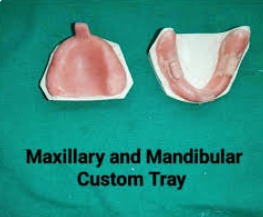
- After the preliminary impression, a custom tray is fabricated to closely fit the patient’s ridges. Custom trays improve accuracy by providing better adaptation to the patient’s unique anatomy.
3. Border Molding
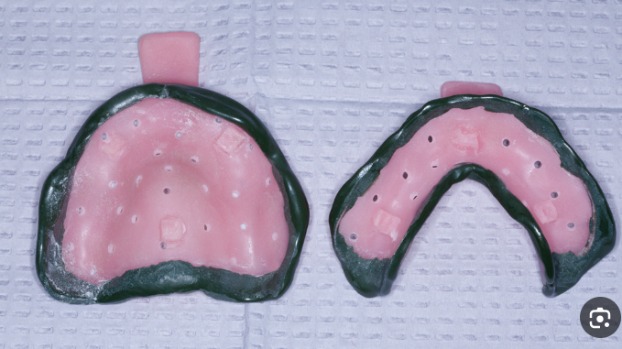
- Purpose: To capture the functional width and depth of the vestibules and ensure proper extension of the denture flanges.
- Technique: A thermoplastic material or impression compound is applied to the edges of the custom tray. The patient is guided to perform various movements, such as opening and closing the mouth, smiling, and moving the tongue, to shape the borders dynamically.
4. Final Impression
- Materials Used: Polysulfide and polyvinyl siloxane are elastomeric impression materials. Zinc oxide-eugenol impression paste sets rigid and is not an elastomer; the manufacturer’s classification of Hiflex ZOE paste makes this distinction explicit. Select the material for the clinical conditions and its instructions.
- Technique: The custom tray is filled with the chosen impression material, following its instructions. Recording the tissues is distinct from recording the maxillomandibular relationship. Choose the impression approach for the tissue conditions and material instructions; one pressure technique should not be prescribed for every ridge.
5. Master Cast Creation
- The final impression is used to create a master cast, which serves as the basis for designing and fabricating the denture.
Importance of Conventional Impression Techniques
While digital techniques are becoming increasingly popular, conventional methods remain a reliable choice for many clinicians. They are particularly advantageous in cases where digital scanning technologies may struggle, such as with highly resorbed ridges or irregular soft tissue contours. Additionally, the use of traditional impression materials allows for a more tactile approach, while the clinician checks whether the required tissue detail has been captured.
Conventional and digital records both require clinical verification; neither method guarantees denture fit or function.
Dual Scan Protocol for Edentulous Patients
For implant planning, a dual-scan approach links the proposed prosthesis with patient anatomy. The Glidewell guide GL-2678015-060925 describes an extraoral denture scan by CBCT or an intraoral scanner, followed by CBCT of the patient wearing the prepared appliance. The extraoral scan is not another patient exposure. This is a vendor-specific pathway, not a requirement for all edentulous treatment.
Glidewell’s Dual-Scan Example for Implant Planning
Introduction
The steps below distinguish appliance preparation, extraoral acquisition and the patient examination. Follow the selected laboratory workflow and the compatible scanner instructions; successful data acquisition still requires review of seating, image quality and registration.
Material Requirements
For the described Glidewell workflow, check the following appliance and recording requirements before acquisition:
✅ Existing well-fitting denture or a clear acrylic duplicate scan appliance
⚠️ The described appliance must not contain metal or mesh.
Suggested bite index: Radiolucent registration material, such as the example named in the linked Glidewell guide.
Reline when needed: The linked guide specifies a hard radiolucent reliner for an inadequately fitting appliance.
Fiducial markers: Radiopaque stickers for the described protocol.
For extraoral CBCT: A foam or Styrofoam support for the appliance.
Step 1: Denture Reline (If Necessary)
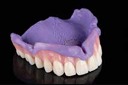
An ill-fitting appliance needs clinical reassessment before it becomes the reference for planning. The linked Glidewell guide describes relining when needed; seating must still be checked rather than assumed from the reline alone.
- Inject the reline material (the hard radiolucent reliner specified for this workflow) onto the intaglio surface of the denture.
- Guide the patient into centric occlusion while the reline material sets.
- Remove the denture and trim excess material to ensure a proper fit.
Use a compatible reliner according to its own instructions and the selected laboratory protocol; do not substitute a different material solely because it appears radiolucent.
Step 2: Bite Registration
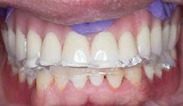
In the linked guide, a radiolucent bite index is suggested to help:
- Establish centric relation
- Prevent denture movement during scanning
- Support reproducible seating of the appliance and later guide; verify fit clinically
Bite Registration Procedure
- Place the denture or scan appliance in the patient’s mouth.
- Apply a thin layer of radiolucent bite registration material.
- Guide the patient to close into centric occlusion and hold position while the material sets.
- Trim excess bite registration material.
Choose the bite-index material with the laboratory and its instructions; the described option is radiolucent.
Step 3: Radiographic Marker Placement
Radiopaque markers identify shared appliance reference points in this protocol. Keep their positions unchanged between acquisitions.
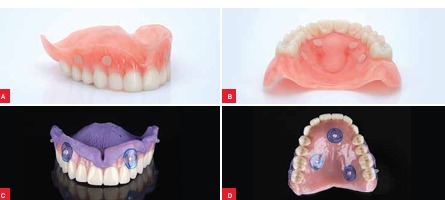
Radiographic Marker Placement Procedure
- Follow the marker arrangement in the linked guide; do not substitute a different protocol’s marker count or material:
- Radiopaque stickers (e.g., Suremark DentalMark 2.0mm Visionline Ball Stickers)
- The current linked guide specifies radiopaque stickers; a drilled gutta-percha alternative is not described in that version.
Step 4: Extraoral Scan of the Denture
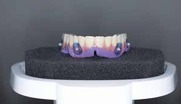
Acquire the appliance dataset outside the mouth. The linked guide permits CBCT or optical scanning; the patient is not irradiated during an extraoral appliance scan.
- If using the CBCT option, support the appliance as specified in the linked guide.
- Capture the complete appliance geometry with the selected extraoral method.
- Use the selected extraoral method:
- CBCT: Follow the scanner’s dedicated appliance protocol.
- Optical scan: Record both intaglio and cameo surfaces as described in the linked guide.
- Do NOT remove fiducial markers between scans.
For the extraoral CBCT option, use the appliance support specified by the guide rather than placing the denture directly on the scanner stand.
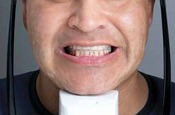
Step 5: CT Scan of the Patient
The patient examination records the prepared appliance in relation to the jaw. This CBCT exposure requires clinical justification and patient-specific acquisition choices.
Patient Scan Procedure
- Seat the prepared denture in the patient’s mouth, checking full seating and the positioning method specified by the selected protocol.
- Instruct the patient to remain still and follow the scanner’s positioning instructions.
- Select the patient acquisition for the clinical question:
- Exposure: Use the lowest dose that provides diagnostically adequate images.
- Field of view: Cover the anatomy needed for the examination and compatible planning pathway.
- Protocol: Do not apply a generic slice thickness or anatomical field boundary to every patient or scanner.
- Confirm that the fiducial markers are visible in the scan and that the denture is fully seated.
Step 6: Data Transfer
The final step involves exporting and transferring the scan data for digital treatment planning and surgical guide fabrication.
Data Transfer Procedure
- Confirm the required export formats with the receiving service: patient CBCT data and an optical denture STL, when that option is used, are different record types.
- Label scans accordingly:
- “Patient” (CBCT scan of the patient wearing the denture)
- “Maxillary Denture” (extraoral appliance dataset, with its acquisition method identified)
- “Mandibular Denture” (extraoral appliance dataset, with its acquisition method identified)
- For the Glidewell service, use its current submission instructions. Other laboratories or planning systems may require different records.
Summary of the Dual-Scan Protocol Workflow
| Step | Procedure |
| Step 1 | Reassess appliance fit and reline if indicated for the selected protocol. |
| Step 2 | Consider the suggested radiolucent bite index for the described pathway. |
| Step 3 | Apply the radiopaque stickers specified for this protocol. |
| Step 4 | Acquire the extraoral denture dataset by CBCT or optical scanning. |
| Step 5 | Scan the patient wearing the denture in the correct occlusion (CBCT scan). |
| Step 6 | Confirm and submit the required CBCT and appliance file formats. |
Advantages of the Dual Scan Protocol
- Shared references: The appliance and its markers provide a basis for relating the prosthesis to patient anatomy; registration still needs verification.
- Improved Implant Planning: Facilitates accurate positioning of implants relative to the prosthesis and anatomical landmarks.
- Different record types: Optical scanning uses no X-rays; patient CBCT does. Neither automatically replaces every clinically needed impression.
- Efficiency: Streamlines the workflow from imaging to prosthetic design.
- Patient burden: Consider the required appointments and records for the individual pathway rather than promising fewer impressions or adjustments.
Applications
- Implant Planning: Helps in determining optimal implant positions for stability and functionality.
- Guided Surgery: Allows for the creation of surgical guides based on the combined 3D model.
- Prosthetic Design: The records can relate the intended restoration to anatomy, but they do not guarantee the fit or function of the final prosthesis.
The value of this pathway is the connection between the reference prosthesis and the planned implant sites. Its limitations remain those of the appliance, acquisition and registration, so verify each before relying on the plan.
Intraoral Scanning
Intraoral scanners record visible surfaces optically. The record may be obtained directly from the mouth or from an appliance or impression, depending on the pathway. 3Shape’s denture guidance describes several such approaches; a digital workflow need not discard functional impressions or try-in stages. The optical principle alone does not establish a device’s clinical accuracy.
Triangulation
- Triangulation is one of the fundamental principles used in optical scanning.
- It involves projecting a laser or structured light onto the tissue surface, which is then reflected back to a sensor at a known angle.
- By measuring the angles and distances between the projected and reflected light, the scanner calculates precise 3D coordinates of the scanned surface.
- The absence of distinct anatomical landmarks can complicate edentulous surface recording; verify the complete record rather than assuming a scanning principle resolves that problem.
Confocal Imaging
- Confocal imaging is an optical approach used by some intraoral scanners.
- It relies on filtering reflected light based on specific focal depths, allowing only sharply focused light to be captured while ignoring out-of-focus areas.
- The optical principle alone does not establish accuracy for a particular edentulous record. Assess the scanner, acquisition method and clinical task together.
Check the Scanner-Specific Method
- Check the selected scanner’s technical documentation instead of ranking devices by an optical-method label.
- Confirm that the chosen acquisition method is supported for the required denture, impression or tissue record.
- Do not assume reduced motion errors or better clinical accuracy without evidence for the actual device and task.
Significance in Edentulous Patients
- Surface capture: Check coverage of the clinically required surfaces; a digital record is not automatically a functional impression.
- Appointments and comfort: These depend on the selected record pathway and patient, rather than a universal digital advantage.
- Improved Digital Workflow: The digital impressions obtained can be directly integrated into CAD/CAM systems for prosthetic design.
- Different error sources: Digital acquisition avoids impression-material changes but can introduce incomplete capture or registration errors. Verify the actual record rather than assuming one method is always more reliable.
Step 3: Data Integration – Relating Anatomy to the Prosthetic Reference
For a justified implant-planning examination, integration relates the jaw anatomy to the intended restoration. A patient CBCT, an extraoral appliance scan and a direct intraoral soft-tissue scan are distinct records. Use only the combination and registration method supported by the chosen software version and laboratory pathway.
Process of Data Integration
- Importing CBCT Data
- The patient CBCT provides volumetric anatomical information for the indicated planning task. Displayed gray values are not automatically calibrated bone-density measurements.
- The prosthetic or surface reference may come from the prepared appliance or another supported record; a direct intraoral scan is not mandatory in every dual-scan pathway.
- Importing Intraoral Scans
- Import a separate optical surface dataset only when it is part of the supported pathway. An optical appliance scan is different from an in-mouth tissue scan.
- Unlike CBCT, intraoral scans provide a highly detailed representation of the soft tissues, ridge contours, and prosthetic surfaces.
- Aligning and Superimposing the Data
- The software relates compatible datasets using the reference features specified for that method. Appliance-marker registration and surface matching should not be treated as interchangeable procedures.
- Inspect the alignment in clinically relevant regions and cross-sections; an apparently merged model is not proof that the anatomy and surface record correspond accurately.
- Refining and Adjusting the Model
- Automatic alignment tools can propose a result. Review it rather than assuming that automation or an AI label corrects every discrepancy.
- If alignment is inadequate, reassess source records and the supported registration method. A manual adjustment is not itself evidence of accuracy.
Checking Integrated Planning Records
- Planning context: The combined records can show the proposed restoration in relation to anatomy; they do not guarantee the surgically achieved implant position.
- Prosthetic Design: Review the planned contours, jaw relation and record quality instead of assuming that a combined model guarantees a perfectly fitting restoration.
- Outcome limits: Accurate-looking digital records do not by themselves establish better functional or esthetic outcomes.
- Improved Communication: Seamless data integration allows for better collaboration between clinicians, prosthodontists, and dental labs.
The practical checkpoint is whether the selected records answer the planning question and agree in the regions used for guide or prosthesis design. Keep this verification separate from claims about treatment success.
Prosthetic planning, implant selection and loading
Start with the intended restoration, jaw relationship and clinical examination. Digital planning is a way to review records and communicate a proposal; it does not establish the correct occlusal vertical dimension or guarantee a functional result without clinical verification.
For fixed full-arch treatment, implant number, dimensions and distribution depend on the prosthetic plan, arch form and available bone. The ITI 2013 full-arch loading consensus supports patient selection and verification of primary stability before immediate loading. It does not make a single implant count or a study inclusion threshold suitable for every patient. Augmentation and sinus-floor procedures can affect the loading decision. The treating team must decide whether immediate, early or conventional loading is appropriate.
Do not derive drilling speed, implant thread design, graft selection or a healing deadline from a bone-density label in an overview article. Review the actual anatomy, treatment alternatives and the current instructions for the selected implant system. A generic size table cannot replace that assessment. Further surgery and the timing of implant placement or restoration require an individual plan.
Surgical-guide design and clinical verification
A guide assists transfer of a plan; deviations remain possible. The ITI 2013 guided-surgery consensus treats guided surgery as an adjunct to diagnosis and planning. It describes both flapless and raised-flap approaches, rather than promising that a guide eliminates surgical trauma or protects every anatomical structure. Review relevant anatomy, planned clearances, support, seating and system compatibility before using the guide.
The selected system determines whether guidance applies to pilot drilling, the osteotomy sequence or implant insertion. A mismatch, movement or unexpected intraoperative finding requires clinical reassessment. Do not assume that a small manual change through a static guide safely corrects a planning error. This overview does not prescribe a drilling sequence, fixation method, insertion torque or universal safety margin.
Manufacturing, cleaning and sterilization
Use a manufacturing process validated for the exact guide material and equipment. Follow the applicable printing, washing, curing, assembly and inspection instructions. Formlabs’ Surgical Guide Resin documentation is one manufacturer-specific example; its parameters should not be transferred to a different resin or system.
Cleaning, disinfection and sterilization are different processes. CDC dental reprocessing guidance requires validated manufacturer instructions and processing appropriate to the item’s clinical use. Chemical disinfection should not be described as interchangeable with sterilization. Confirm the guide, sleeves, instruments, packaging and sterilizer are compatible with the required process. When instructions are unclear, obtain manufacturer clarification before use; do not invent a time or temperature.
Recording implant positions for the prosthesis
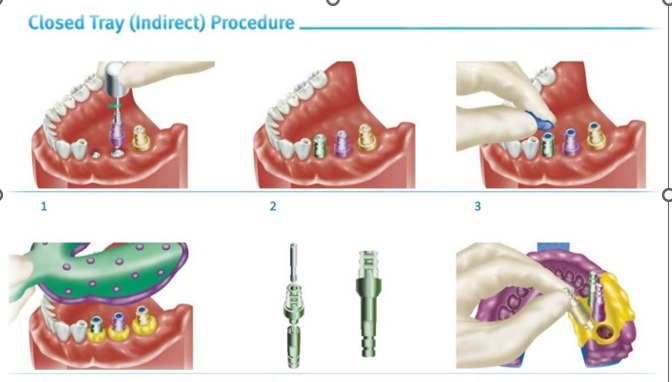
Choose an analog or digital record pathway that is compatible with the implants, components and laboratory workflow. Confirm component seating and record quality. Neither an open-tray label nor a digital device name alone establishes that the resulting record is sufficiently accurate for a full arch.
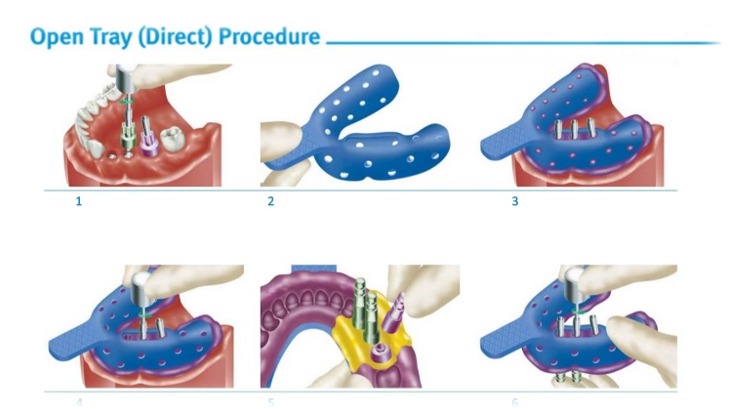
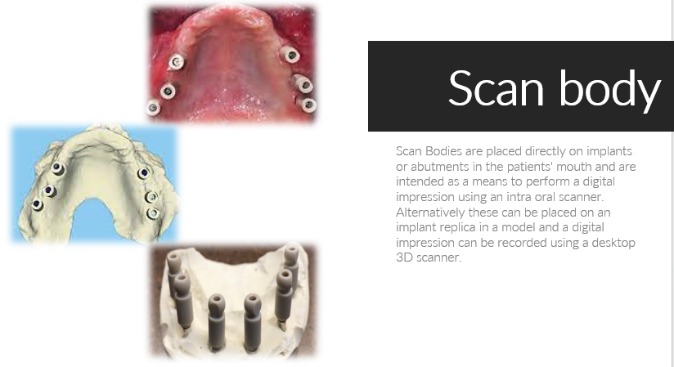
For digital capture, use the specified scan bodies or other optical components and verify compatibility with the intended software and restoration. A scan-body record and a soft-tissue or jaw-relation record answer different questions.
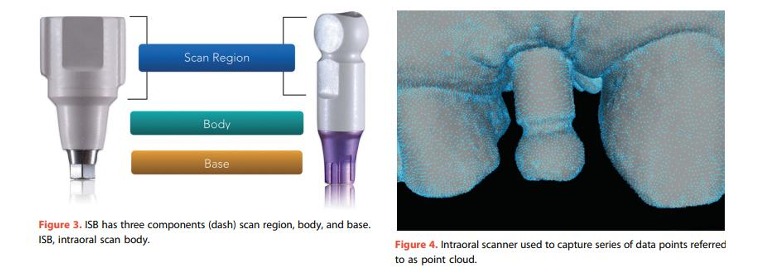
Identify each component and consult its current applicable instructions for compatibility, tightening and reprocessing. A historical comparison image cannot establish those requirements for the product in use.
Photogrammetry: a component-specific pathway
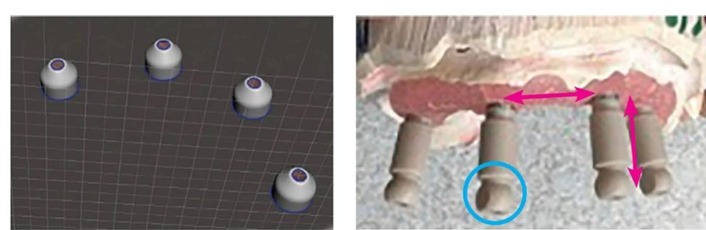
Implant photogrammetry uses system-specific optical components. For example, the PIC transfer instructions describe coded transfers mounted on implants or abutments; the method is not marker-free. The PIC workflow also requires separately recorded gingival data. Implant-position capture alone does not supply every surface or jaw-relation record, and these illustrations do not establish a universal accuracy ranking.
Abutments, materials and prosthesis delivery
Select the restorative components with the implant system, planned prosthesis and patient-specific conditions in mind. Check the exact connection, component identity and applicable instructions before assembly. Stock, custom, angled and multi-unit components are not interchangeable merely because they appear similar. The Nobel Biocare IFU portal illustrates why country and product-specific instructions matter; it is a lookup resource, not an endorsement of a particular component or a generic torque table.
Material selection and laboratory design should address the intended use, available restorative space, hygiene access and maintenance needs. A material name alone does not establish superiority, durability or a “shock-absorbing” clinical benefit. Verify fit, tissue clearance, jaw relation and the planned restoration clinically before delivery. Use the relevant manufacturer instructions for tightening, processing and maintenance rather than transferring numbers from an illustration.
Postoperative instructions and follow-up
Provide an individual written postoperative plan and a way to contact the treating service. Pain medication, mouth rinses, wound cleaning, diet, activity and review timing must reflect the procedure and the patient. Cambridge University Hospitals’ implant leaflet is an example of service-specific patient advice, rather than a universal regimen for every full-arch or grafting procedure.
Do not treat a generic article as a prescription. The clinician should review medical history, allergies, current medicines and contraindications before selecting treatment. ADA acute dental pain guidance addresses toothache and extraction-related pain; it should not be relabeled as a validated full-arch implant-drug protocol. This overview therefore gives no fixed analgesic dose or routine chlorhexidine concentration, frequency or duration.
Arrange healing reviews and any suture or prosthetic care with the treating team. Loading readiness should be assessed clinically for the selected protocol, not inferred from elapsed months or a generic torque test. Select follow-up imaging for the clinical question, using individualized ADA imaging guidance; do not schedule CBCT automatically because a calendar interval has passed.
The EFP’s graphic adaptation of its 2023 peri-implant guideline recommends regular supportive care and individualized oral-hygiene instruction. Assess tissue health, hygiene access and the prosthesis, and adjust follow-up to the patient’s condition. Its follow-up recommendations after treatment of peri-implantitis should not be copied as a universal postoperative schedule for a newly placed implant. Patients who notice inflammation or other concerns should contact their treating clinician rather than simply wait for the next planned review.
Scope of this educational overview
The linked guidance and manufacturer examples support the distinctions above; they do not establish a complete surgical protocol or replace patient-specific clinical judgment. The illustrations are teaching material, not documented proof of this patient’s outcome, component compatibility or numerical treatment targets.
References
manufacturer’s classification of Hiflex ZOE paste
Glidewell guide GL-2678015-060925
ITI 2013 full-arch loading consensus
ITI 2013 guided-surgery consensus
Formlabs’ Surgical Guide Resin documentation
CDC dental reprocessing guidance
Cambridge University Hospitals’ implant leaflet
About Dr. Haitham Sharshar



Dr. Haitham Sharshar is an international digital dentistry speaker, educator, and digital occlusion consultant based in Cairo, Egypt. His work focuses on functional digital dentistry, CAD/CAM, implantology, jaw-motion analysis, and the integration of digital diagnostics into clinical treatment planning.
As Founder and Scientific Coordinator of Digital Dentistry Schoology (DDS), he has trained more than 3,270 dentists and dental technicians through university programs, international conferences, and hands-on courses. His teaching connects patient-specific diagnostic records with digital design and clinical workflows, helping clinicians and technicians understand how function and occlusion inform restorative planning.
Dr. Sharshar is a certified trainer for zebris JMA-Optic+ jaw-motion analysis and MyoWise dental EMG. His educational and consulting work brings together patient diagnostics, jaw-motion records, muscle-activity data, digital occlusion, and AI-supported workflows.
He is Founder and Clinical Director of Occlusa, an AI-supported platform for organizing clinical information and supporting clinician-led review and treatment planning. He also owns HS Dental Clinic in Cairo, where his clinical focus includes full-mouth digital rehabilitation and smile design.
His speaking and training topics include functional digital dentistry, digital occlusion, jaw-motion analysis, CAD/CAM workflows, digital implantology, and the practical integration of AI-supported tools into dental education and clinical practice.
WHERE DIGITAL MEETS CLINICAL
Happy to collaborate on spreading digital dentistry.
h.sharshar@ddschoology.com